Article 2.5: Base System Hardening, Utilities & Folder Structure
Hardening the base system, setting utilities, and defining structure so everything above it behaves predictably.
Laying the foundation
Purpose:
- Make the system usable, debuggable, and predictable
- Avoid “why is this broken?” moments later
- Still no Docker yet
1. DNS Configuration
ISP-provided DNS is often unreliable. On Jio, it also blocks or interferes with certain domains and services. The fix is simple: use a clean, external resolver and encrypt DNS queries.
Configure DNS and DNS-over-TLS
Edit the resolved configuration:
1
sudo vim /etc/systemd/resolved.conf
Set:
1
2
3
[Resolve]
DNS=9.9.9.9#dns.quad9.net 149.112.112.112#dns.quad9.net 2620:fe::fe#dns.quad9.net 2620:fe::9#dns.quad9.net
DNSOverTLS=yes
Restart:
1
sudo systemctl restart systemd-resolved
This uses Quad9 with DNS-over-TLS enabled.
What this gives you:
- Reliable resolution
- No ISP DNS interference
- Encrypted DNS queries (prevents tampering and inspection)
You can use Google DNS instead, but Quad9 provides malware blocking by default.
2. Essential Tools
These tools are required for monitoring, debugging, networking, and file movement.
Monitoring
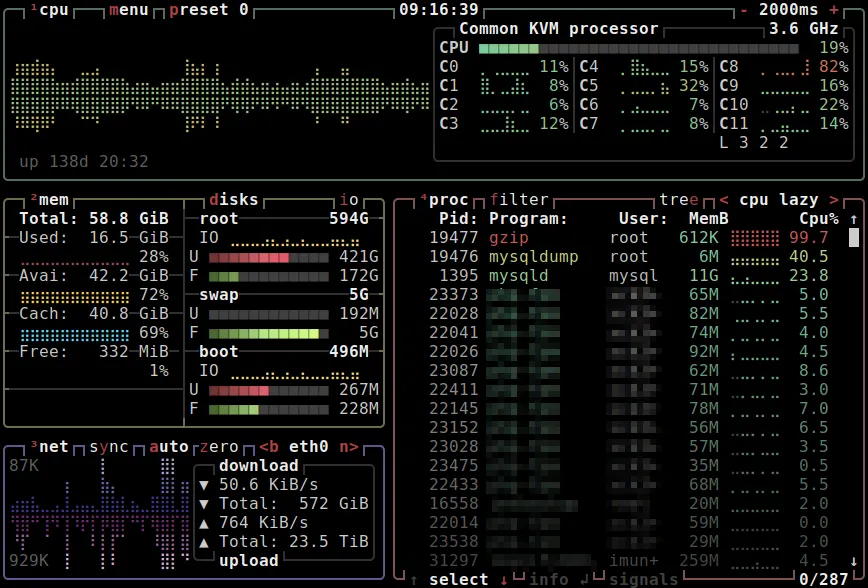
btop– real-time CPU, disk, memory, and network usage
Build / system
build-essential– required for compiling tools later (not mandatory, but useful)curl,wget– API calls, downloads, testing endpoints
File transfer
scp– simple file copy over SSHrsync– efficient, resumable transfers (used later for backups)
Media
yt-dlp– youtube media downloader tool
Networking / diagnostics
ip a– IP address detailsip link– interface statusping– reachabilitynslookup,dig– DNS debuggingiperf3– network throughput testingfast-cli– quick internet speed checktailscale status– Tailscale connectivity
Install all
1
2
3
4
sudo apt install \
  btop build-essential \
  curl wget rsync \
  iperf3 dnsutils iproute2
Install yt-dlp
Install uv first (the rust based client for python)
1
2
curl -LsSf https://astral.sh/uv/install.sh | sh
uv tool install yt-dlp
1
2
3
4
5
6
7
#usage
yt-dlp '<playlist/video url>'
#if limit reaches add cookies
#get the cookies from browser using 'Get cookies.txt LOCALLY' extension
yt-dlp '<playlist/video url>' --cookies <file_path>
#send the cookies file from working device to server using scp on working device
scp <path_to_cookies> <user>@<server_ip>:<path_to_save_cookies>
Install fast-cli
Download the latest release from the releases section and unzip it to /usr/local/bin/
Run using fast-cli
3. Laptop-Specific Behaviour
Now, you might be using a laptop as the server. And a server looks cool when it works even if the lid is closed , which by default makes it sleep. So :
1
sudo vim /etc/systemd/logind.conf
Set:
1
2
HandleLidSwitch=ignore
HandleLidSwitchDocked=ignore
Then:
1
sudo systemctl restart systemd-logind
4. Wi-Fi Configuration
Ethernet is always preferred
So Wi-Fi is a:
- Backup
- Temporary
- Laptop-only
Setup
- Check interface starting with
1
ip link
- TUI method (recommended)
1
2
3
4
5
sudo nmtui
#steps
#select 'Activate a connection'
#go to 'Wi-Fi' section and select the connection
#enter the password and you are good to go
- CLI method (reference only)
1
2
3
4
sudo nmcli dev wifi rescan
sudo nmcli dev wifi list
sudo nmcli dev wifi --ask connect "SSID"
#enter the passoword
- Server-grade reliability → Ethernet
- Wi-Fi is acceptable for edge cases
- By default, all the traffic goes through the ethernet
5. Folder Structure on /mnt/hdd4tb
Data disk (/mnt/hdd4tb)
1
2
3
4
5
6
7
8
9
10
11
/mnt/hdd4tb/
├── media/
│   ├── movies/
│   ├── shows/
│   ├── anime/
│   ├── cartoon/
│   └── music/
├── torrents/
├── games/
├── immich/
└── files/
Application layout (/home/<user>/home_nas)
1
2
3
4
5
6
7
8
/home/<user>/home_nas/
├── misc/
├── monitoring/
├── media_server/
├── immich_app/
├── file_server/
├── docker-compose.yml
└── .env
Principle:
- Actual data lives on the HDD
- Container configs and compose files live in the home directory
/mnt/hdd1tbis reserved for backups (covered later)
This separation:
- Simplifies backups
- Makes migrations trivial
- Avoids Docker owning your data
Reference guide (aligned with this approach): https://trash-guides.info/File-and-Folder-Structure/
What’s Next
- Article 3: Docker setup, volume layout, service deployment
- Article 4: Backup strategy, rsync scripts, failure recovery