Article 3: Docker setup, volume layout, service deployment
Erecting the walls, installing services, and connecting everything so the system actually functions.
Building the structure and running the wiring
From here on, everything runs in containers.
Installing Docker
Install Docker and Docker Compose from Debian repositories:
1
sudo apt install docker.io docker-compose
Allow your user to run Docker commands without sudo:
1
sudo usermod -aG docker <user>
Log out and log back in for the group change to take effect.
Verify:
1
docker ps
Compose Layout
I follow this structure:
- One compose file per service
- A single root compose file that includes them
- Easy to bring the whole stack up/down
References:
- LinuxServer images: https://www.linuxserver.io/our-images
- Compose layout inspiration: https://github.com/labmonkey/docker-compose-project-example
- My GitHub repo : https://github.com/SamarthJ2004/home_nas
I use mostly LinuxServer.io images because they are well-tested and stable. Otherwise I use their official Docker images.
In summary:
- Each service has its own
<service_name>.yml - All service files are included in one main
docker-compose.yml - Ports are defined inside service files
- Format is always
external_port:container_port
This is far better than managing one big file.
Directory Structure Recap
1
2
3
4
5
6
7
8
9
10
11
12
13
14
15
16
17
18
19
20
/home/<user>/home_nas/
├── media_server/
│   ├── qbittorrent.yml
│   ├── jellyfin.yml
│   ├── radarr.yml
│   ├── sonarr.yml
│   ├── jellyseerr.yml
│   └── komga.yml
├── immich_app/
│   └── immich.yml
├── file_server/
│   ├── nextcloud.yml
│   └── bentopdf.yml
├── monitoring/
│   └── nginx.yml
├── misc/
│   ├── yamtrack.yml
│   └── samba.yml
├── docker-compose.yml
└── .env
Root docker-compose.yml
Create this file at /home/<user>/home_nas/docker-compose.yml:
1
2
3
4
5
6
7
include:
  - path:
      - ${INCLUDE_PATH}/media_server/qbittorrent.yml
      - ${INCLUDE_PATH}/media_server/jellyfin.yml
      - ${INCLUDE_PATH}/media_server/radarr.yml
      - ${INCLUDE_PATH}/media_server/sonarr.yml
      - ${INCLUDE_PATH}/media_server/komga.yml
Create .env in the same directory:
1
INCLUDE_PATH=${PWD}
Have a separate path section for each folder.
Service 1: qBittorrent (Start Here)
We start with qBittorrent because it is simple and gives immediate results.
media_server/qbittorrent.yml
1
2
3
4
5
6
7
8
9
10
11
12
13
14
15
16
17
18
services:
  qbittorrent:
    image: lscr.io/linuxserver/qbittorrent:latest
    container_name: qbittorrent
    environment:
      - PUID=1000
      - PGID=1000
      - TZ=Asia/Kolkata
      - WEBUI_PORT=8080
      - TORRENTING_PORT=6881
    volumes:
      - ./qbittorrent/appdata:/config
      - /mnt/hdd4tb:/pool
    ports:
      - 8080:8080
      - 6881:6881
      - 6881:6881/udp
    restart: unless-stopped
Bring it up:
1
docker compose up -d qbittorrent
Access:
1
http://<server-ip>:8080
Create a user and password on first login.
Important usage rules
- Torrents go under
/pool/torrents - Games under
/pool/games - Do not scatter downloads randomly (think and then decide for each)
Service 2: Jellyfin (Media Server)
media_server/jellyfin.yml
1
2
3
4
5
6
7
8
9
10
11
12
13
14
15
16
17
18
19
services:
  jellyfin:
    image: jellyfin/jellyfin:10.11.5
    container_name: jellyfin
    user: 1000:1000
    ports:
      - 8096:8096/tcp
      - 7359:7359/udp
    volumes:
      - ./jellyfin/config:/config
      - ./jellyfin/cache:/cache
      - type: bind
        source: /mnt/hdd4tb
        target: /pool
    restart: 'unless-stopped'
    group_add:
      - '992'
    devices:
      - /dev/dri/renderD128:/dev/dri/renderD128
Bring it up:
1
docker compose up -d jellyfin
Access:
1
http://<server-ip>:8096
Create:
- Admin account
- Users
- Attach media libraries (
/pool/media/cartoon,/pool/media/animeetc. )
I recommend keeping the version pinned and only update on official releases. Plugins and transcoding setup can be done later.
Service 3: Radarr (Movies Automation)
media_server/radarr.yml
Radarr handles movie downloads and naming.
Key configuration points:
- Mount movie directory
- Use qBittorrent as download client
- Follow correct naming conventions
Naming guide (strongly recommended): https://trash-guides.info/Radarr/Radarr-recommended-naming-scheme/
Important Radarr settings:
- Enable Advanced Settings
- Movie root folder:
/pool/media/movies - Download client — Host:
qbittorrentPort:8080Category:radarr - Metadata(optional): Enable Kodi (XBMC) / Emby & Tick all options, if you want Radarr to get the metadata instead of Jellyfin itself.
Docker container name automatically works as hostname.
Service 4: Sonarr (TV + Anime)
media_server/sonarr.yml
Sonarr works exactly like Radarr, but for shows.
- Root folders:
/pool/media/shows,/pool/media/anime - Same qBittorrent client
- Category:
tv-sonarr
Naming guide: https://trash-guides.info/Sonarr/Sonarr-recommended-naming-scheme/
Keep anime and TV separately for clarity.
Download flow:
- Set torrent category in qBittorrent
- Add series in Sonarr/Radarr
- Auto-import after download
- Track progress in Activity
- Media appears in Jellyfin automatically
RSS feeds, indexers, and tags will be introduced later.
Service 5: Komga (Manga)
media_server/komga.yml
- Create a user
- Add library:
/pool/torrents
I keep manga inside torrent folders. You can optionally move to /pool/torrents/manga. qBittorrent auto-creates folders if missing.
The main media server is now completed lets do Immich.
Service 6: Immich (Self Hosted Google Photos)
immich_app/immich.yml
Add to root docker-compose.yml:
1
2
3
  - path:
      - ${INCLUDE_PATH}/immich_app/immich.yml
    env_file: ${INCLUDE_PATH}/immich_app/.env
Inside immich_app/:
- Copy
immich.ymland.envfrom my GitHub - Keep image versions pinned and upgrade only on official releases else it might break
- Port:
2283
Important Immich notes:
- Upload images as folders (web works but mobile app has limitations)
- Enable email notifications
- Configure storage template (important):
1
2

{{#if album}}{{{album}}}{{else}}_NoAlbum{{/if}}/{{filename}}
This template keeps album structure intact and places ungrouped photos in _NoAlbum. I used ChatGPT to generate this template.
Initial indexing is CPU-intensive. Let it run for hours if needed. This is one-time. There is a lot to explore in Immich , explore and read its documentations.
Service 7: NextCloud (Self Hosted Google Drive)
file_server/nextcloud.yml
Add to root docker-compose.yml:
1
2
  - path:
      - ${INCLUDE_PATH}/file_server/nextcloud.yml
Copy nextcloud.yml from my GitHub and keep this image version pinned
- Mariadb : Hostname
mariadbPort3306 - The password and the user can be set in the
nextcloud.yml
Easy to set up:
- Start container
- Connect MariaDB during first-run setup
- Defaults worked fine
Service 8: Nginx Proxy Manager (Reverse Proxy)
monitoring/nginx.yml
This service is a gift for non-tech savvy setups.
Steps:
- Get API key to edit zone DNS setting from Cloudflare admin panel (SSL/TLS section) by DNS challenge (DNS setup is better than HTTP)
- Issue the certificate using Let’s Encrypt DNS option
- Add proxy hosts
Example: qBittorrent
- Domain:
qbittorrent.<domain> - Scheme:
https - Forward hostname/IP:
qbittorrent - Forward port:
8080(container port, not host-exposed port) - Enable WebSocket support
- Enable Force SSL + HTTP/2
- Select the SSL certificate
Test:
1
https://qbittorrent.<domain>
Repeat for other services.
Be sure to use the container ports and not the host-exposed port
Service 9: Jellyseerr
media_server/jellyseerr.yml
A media request service integrated with Jellyfin , Radarr and Sonarr. So users can request the shows , movies or cartoons through this. Create a Sonarr instance for each media folder.
Connect all of them with the respective API keys.
Service 10: Samba
misc/samba.yml
Copy the Docker compose from my Github and make the suitable changes. Then add the following to the misc/samba/data/config.yml
1
2
3
4
5
6
7
8
9
10
11
12
13
14
15
16
auth:
  - user: <user>
    group: <group>
    uid: 1000
    gid: 1000
    password: <password>
global:
  - "hosts allow = 0.0.0.0/0 ::/0"
  - "hosts deny = "
share:
  - name: media
    path: /samba/share/media
    browsable: yes
    readonly: no
    guestok: yes
    writelist: <user>
The user and group can be found using the id command. Also, you can add more folders you want to be visible and set the options as required. Then you can use smb to mount these on your system access the data.
Remaining Services
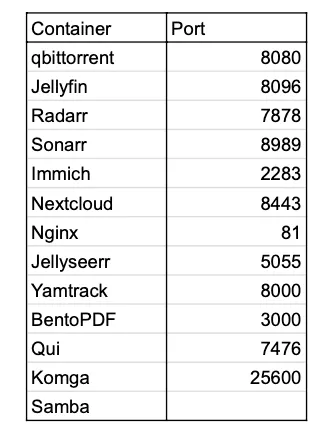
- Yamtrack — watchlist tracking
- BentoPDF — self-hosted PDF editing
- Qui — qBittorrent UI overlay
All 13 services follow the same compose pattern.
Additional Configuration
Transcoding Configuration:
- Select the hardware (for me, Intel QuickSync(QSV))
- Also enable transcoding for HEVC
- Enable VPP Tone Mapping
- Enable Tone Mapping
If the server is overheating then throttle transcoding.
Jellyfin Plugins:
- Intro Skipper
- Playback Reports
- TheTVDB
- Reports
Adding RSS (Really Simple Syndication) to Sonarr
- Go to indexers section and then add a Torrent RSS feed
- Add the RSS url
- Add the tag seasonal (or any other you like)
- Add the seasonal tag to the series you want provided from that RSS
Why Jellyfin Transcodes
- Client device doesn’t support the codec
- Resolution or bitrate mismatch
- Network constraints
Using the integrated GPU for transcoding is far more power-efficient than CPU but with quality loss. For this, two sections are added: group_add and devices to jellyfin.yml.
Dockman
A tool in rust for better docker container management - SamarthJ2004/dockman
Read the readme.