Decoding DNS Bit By Bit
This article is not meant to be for beginners. This is just a technical guide to give actual bit-wise hands-on and not explaining theory.
Scope & Assumptions
- Assumes familiarity with IP, UDP, hex, and sockets
- No DNS theory, hierarchy, or caching discussion
- Focuses strictly on wire format and behaviour
DNS: Domain Name System is a part of the Application Layer. DNS queries are typically sent over UDP; TCP is used for truncation, zone transfers, and explicit TCP queries.
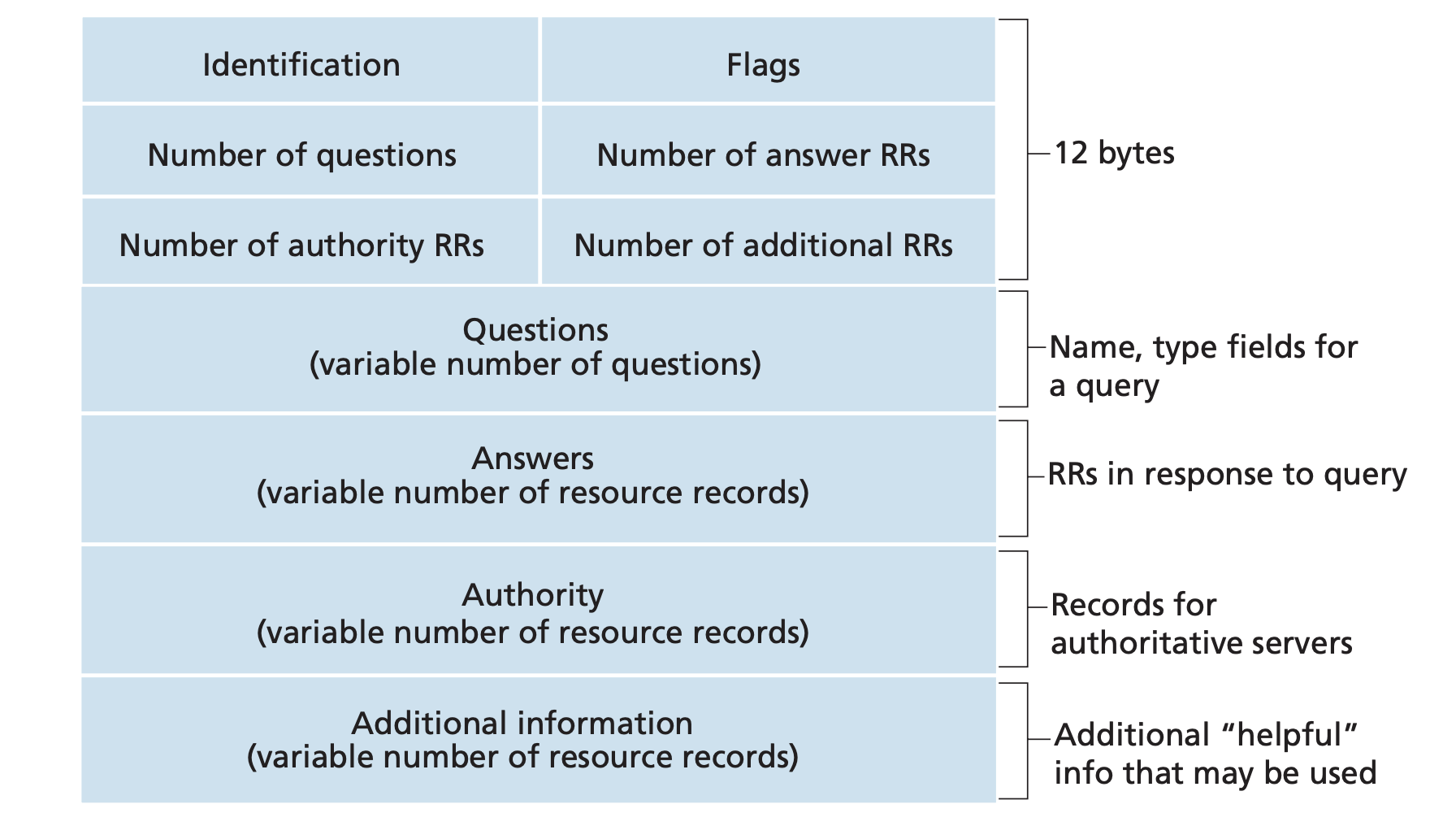
1. The Wire Protocol & Message Format (The Core)
Query
- Two parts: Header and Question Records.
Response
- Header, Question Records, Answer Records, Authoritative Records, Additional Records.
Header
- Identification: A random 16-bit (2 bytes) binary number chosen by the client.
- Flags: 16 bits.
1
2
3
4
5
6
7
8
9
10
11
12
13
14
  0  1  2  3  4  5  6  7  8  9  10 11 12 13 14 15        --> bits
+--+--+--+--+--+--+--+--+--+--+--+--+--+--+--+--+
|                      ID                       |
+--+--+--+--+--+--+--+--+--+--+--+--+--+--+--+--+
|QR|   OpCode  |AA|TC|RD|RA|  3 0's |   rCODE   |        --> flags
+--+--+--+--+--+--+--+--+--+--+--+--+--+--+--+--+
|                    QDCOUNT                    |
+--+--+--+--+--+--+--+--+--+--+--+--+--+--+--+--+
|                    ANCOUNT                    |
+--+--+--+--+--+--+--+--+--+--+--+--+--+--+--+--+
|                    NSCOUNT                    |
+--+--+--+--+--+--+--+--+--+--+--+--+--+--+--+--+
|                    ARCOUNT                    |
+--+--+--+--+--+--+--+--+--+--+--+--+--+--+--+--+
- QR (1 bit): Query (0) or Response (1).
- Opcode (4 bits): Usually 0 (Standard query).
- AA (1 bit): Authoritative Answer.
- TC (1 bit): Truncated.
- RD (1 bit): Recursion Desired.
- RA (1 bit): Recursion Available (set by server in response).
- Zeros (3 bits): Reserved for future use.
- rCODE (4 bits): Response code (0: No error).
Common Parameter Values
1
2
3
4
5
6
7
8
9
10
11
12
13
14
15
16
17
18
19
rCODE (Response Code)
| rCODE | Name     | Description             |
|:-----:|----------|-------------------------|
| 0     | NoError  | No Error                |
| 1     | FormErr  | Format Error            |
| 2     | ServFail | Server Failure          |
| 3     | NXDomain | Non-Existent Domain     |
| 4     | NotImp   | Not Implemented         |
| 5     | Refused  | Query Refused           |


Query Types (QTYPE)
| Type  | Value | Description          |
|:-----:|:-----:|----------------------|
| A     | 1     | IPv4 Address         |
| NS    | 2     | Name Server          |
| PTR   | 12    | Pointer (rDNS)       |
| AAAA  | 28    | IPv6 Address         |
For a complete list of parameters, refer to IANA DNS Parameters.
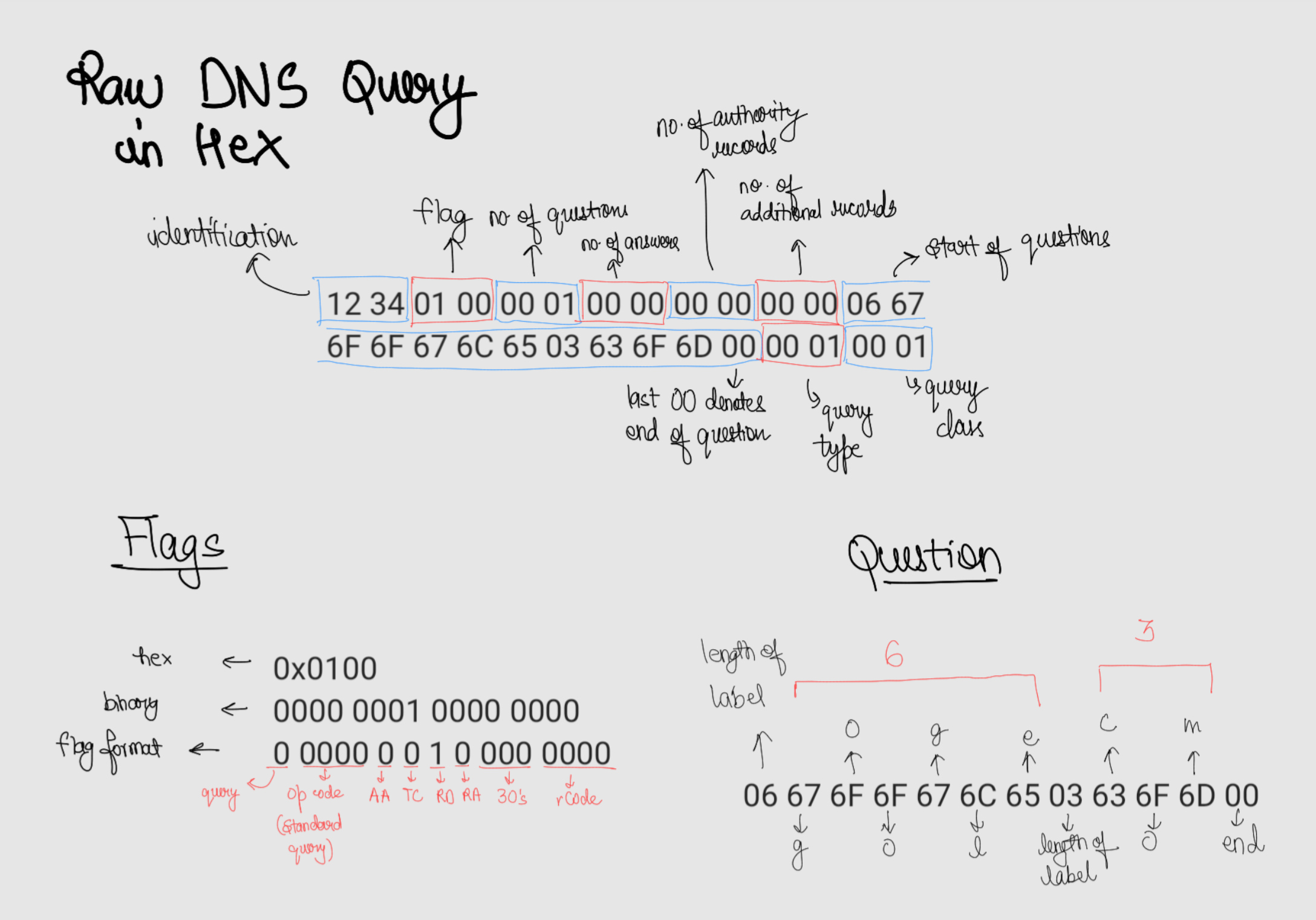
Let’s say we want to query regarding google.com
Header
- Identification:
0x1234 - Flags:
0 0000 0010 000 0000–>0x0100(Recursion Desired) - Question Records:
0x0001 - Answer Records:
0x0000 - Authoritative Records:
0x0000 - Additional Records:
0x0000
Hex Stream: 0x123401000001000000000000
Question Section
The questions are case-insensitive, so even if you send the ASCII for upper case or a mix, the answer would be the same.
Query name is of the format: length label, length label, ... 00

6 g o o g l e 3 c o m 0 : 0x06 67 6F 6F 67 6C 65 03 63 6F 6D 00
- Query Type:
0x0001(IPv4 : Type A) - Query Class:
0x0001(Internet)
Hex Stream: 0x06676F6F676C6503636F6D0000010001
Full Query Message: 12 34 01 00 00 01 00 00 00 00 00 00 06 67 6F 6F 67 6C 65 03 63 6F 6D 00 00 01 00 01
Command to send this query:
1
echo "12 34 01 00 00 01 00 00 00 00 00 00 06 67 6F 6F 67 6C 65 03 63 6F 6D 00 00 01 00 01" | xxd -r -p | socat - UDP:8.8.8.8:53 | xxd
You can either use hexdump or xxd : Hexdump vs xxd
Use Wireshark : it will make this decoding simple. It show you everything in a structured way
Now try constructing the DNS query for greyninja.dev

1
echo "12 34 01 00 00 01 00 00 00 00 00 00 09 67 72 65 79 6E 69 6E 6A 61 03 64 65 76 00 00 01 00 01" | xxd -r -p | socat - UDP:8.8.8.8:53 | xxd
Response
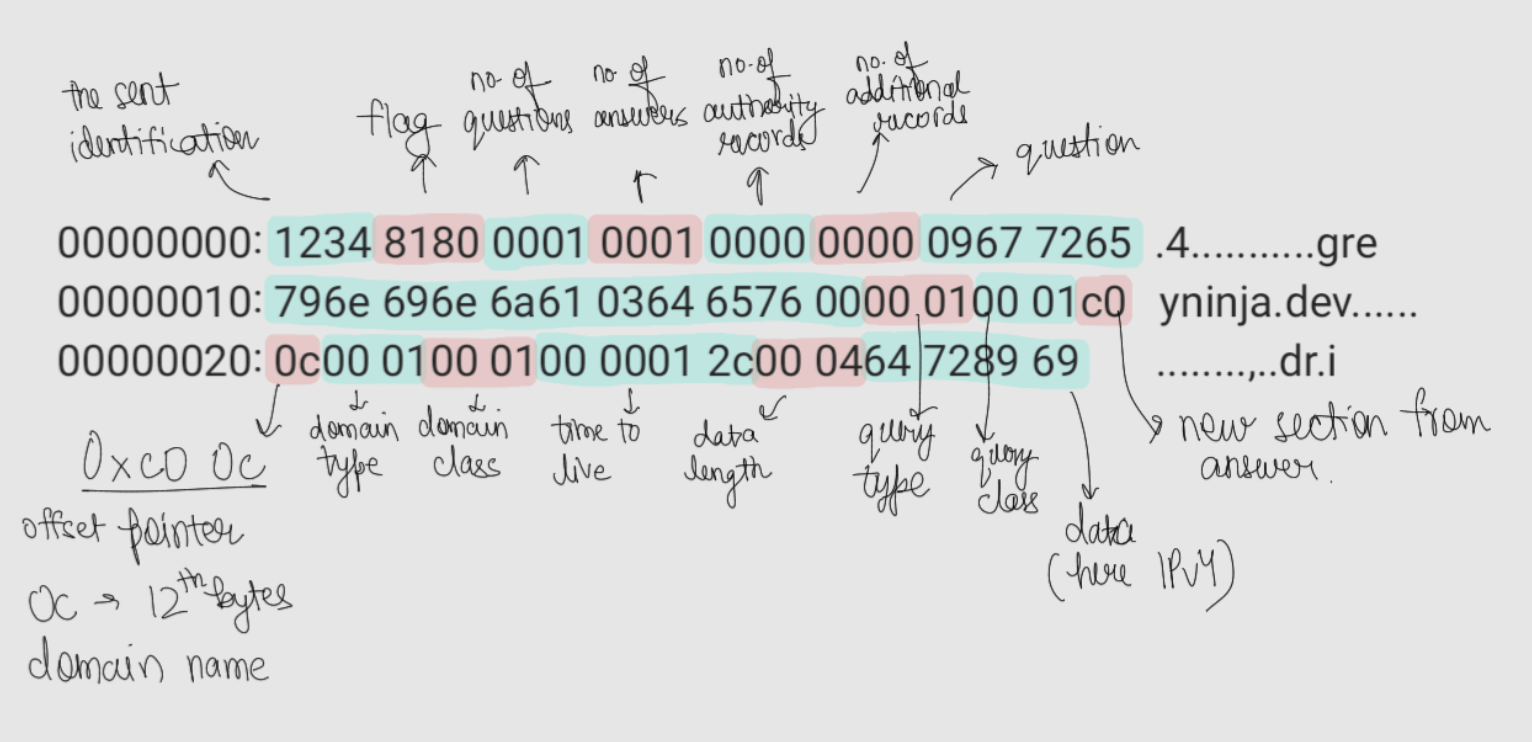
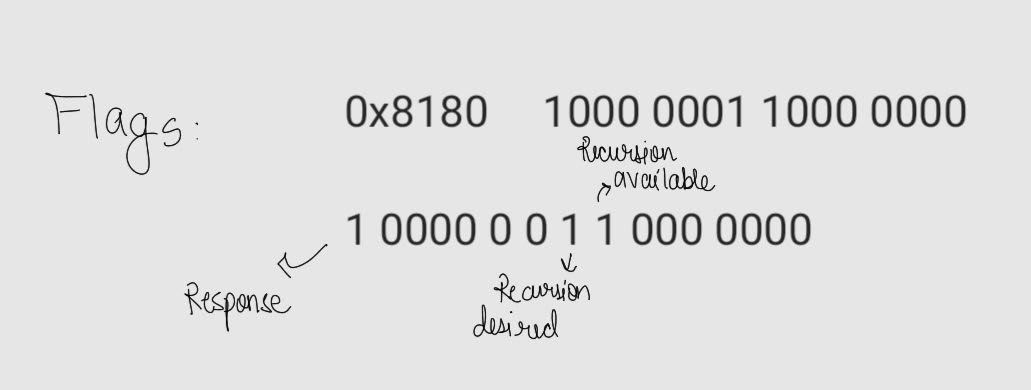
Decoding
1
2
3
4
5
6
7
8
9
...
09 67 72 65 79 6e 69 6e 6a 61 03 64 65 76 00 : greyninja.dev
...
c0 0c : offset pointer to start of the question i.e the 12th (0x0c) byte starting from 0th byte
00 01 : domain type same as query type
00 01 : domain class same as query class
00 00 01 2c : 4 byte Time To Live (TTL) = 256 + 32 + 12 = 300 seconds
00 04 : length of response data
64 72 89 69 : 100 114 137 105 (The IP)
- The “Why”: Explain that
c0(binary 11000000) signals a pointer. - The “Where”: The
0c(decimal 12) points to the 12th byte (starting from 0) of the message (the start of the name in the Question section). This is a core “low level” optimization to save space.
Creating rDNS query
Reverse DNS records are stored in a top-level domain (TLD) called .arpa.
- For IPv4: It uses the
in-addr.arpasubdomain. - For IPv6: It uses the
ip6.arpasubdomain.
Also, the IP addresses are reversed like:
- For
8.8.4.4it stores it as:4.4.8.8.in-addr.arpa - For
2404:6800:4007:80b::200eit stores it as:e.0.0.2.0.0.0.0.0.0.0.0.0.0.0.0.b.0.8.0.7.0.0.4.0.0.8.6.4.0.4.2.ip6.arpa
Try doing rDNS query using nslookup, just use IP addresses instead of domains:
1
2
3
4
5
nslookup 2404:6800:4007:80b::200e
# Response: e.0.0.2.0.0.0.0.0.0.0.0.0.0.0.0.b.0.8.0.7.0.0.4.0.0.8.6.4.0.4.2.ip6.arpa	name = pnmaaa-aw-in-x0e.1e100.net.

nslookup 8.8.4.4
# Response: 4.4.8.8.in-addr.arpa	name = dns.google.
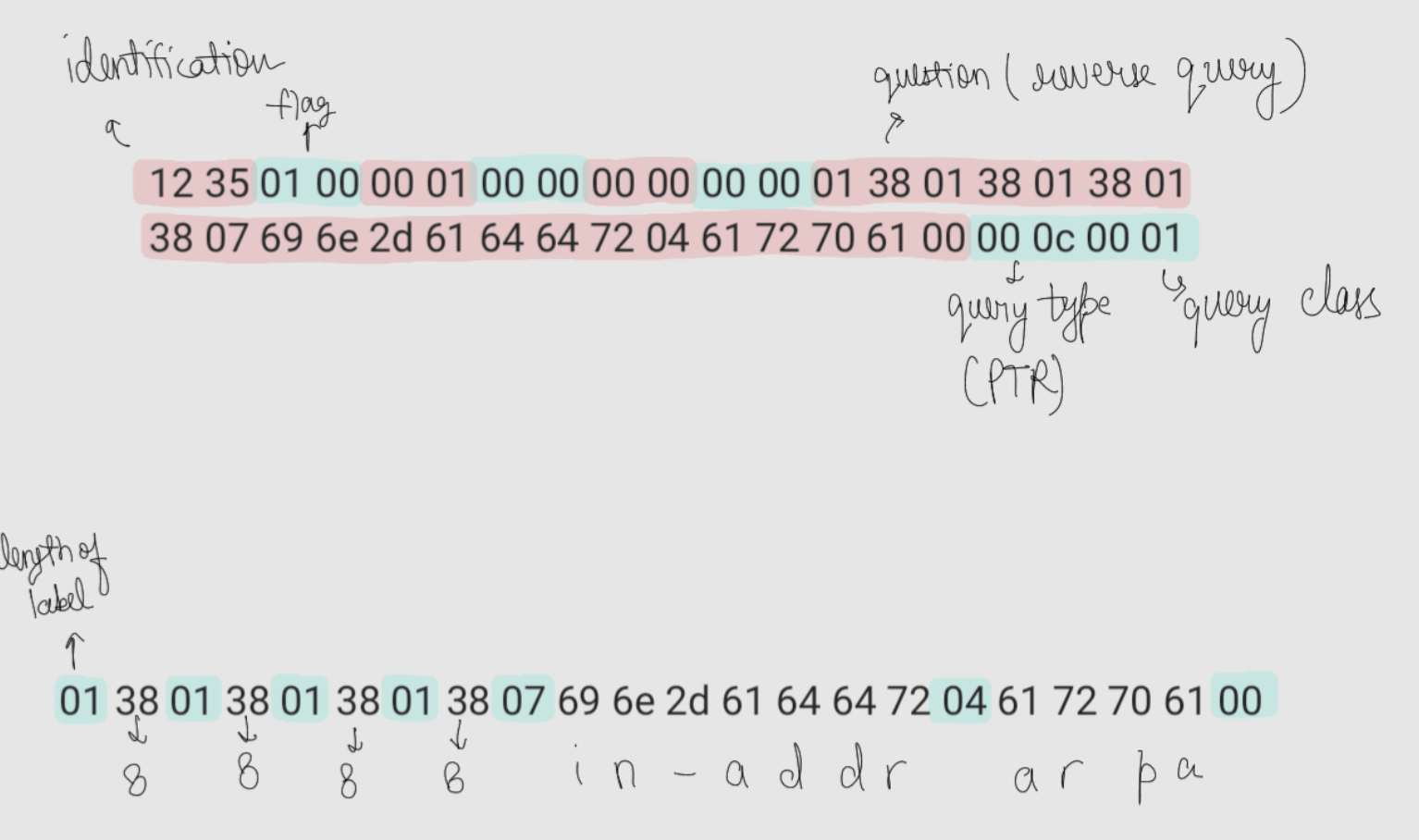
Now let’s do a byte level rDNS query
Here the query type changes to PTR with code 12 i.e. 0x0C in hex.
1
echo "12 35 01 00 00 01 00 00 00 00 00 00 01 38 01 38 01 38 01 38 07 69 6e 2d 61 64 64 72 04 61 72 70 61 00 00 0c 00 01" | xxd -r -p | socat - UDP:8.8.8.8:53 | xxd
Try decoding the response yourself, just follow the steps with the last response decoding
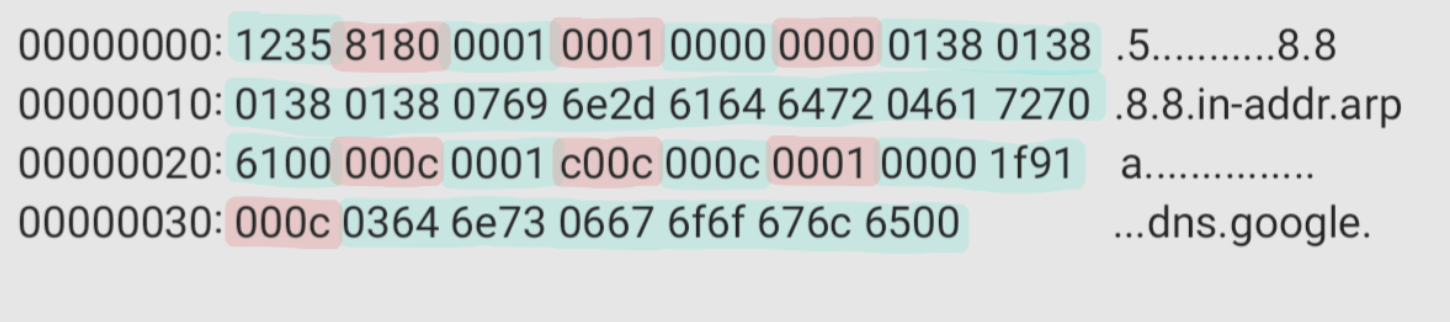
Reverse DNS queries are difficult to find. For example, you cannot get the rDNS of a private IP like that of Tailscale as it is not publicly reachable. Also, not all services set an rDNS.
It is also difficult to send an iterative DNS query instead of recursive as the ISP generally ignores it. It is a safety mechanism against DoS as the number of queries will else grow exponentially.
Asking multiple questions in a single DNS query is not generally supported by servers; they do not handle it.
TCP
Just prefix the UDP query with the query length: (of the original packet only).
1
echo "00 1C 12 34 01 00 00 01 00 00 00 00 00 00 06 67 6F 6F 67 6C 65 03 63 6F 6D 00 00 01 00 01" | xxd -r -p | socat - TCP:8.8.8.8:53 | xxd
1
2
3
00000000: 002c 1234 8180 0001 0001 0000 0000 0667  .,.4...........g
00000010: 6f6f 676c 6503 636f 6d00 0001 0001 c00c  oogle.com.......
00000020: 0001 0001 0000 0089 0004 8efa 4d8e       ............M.
The starting 00 1C of the query is the length i.e. 28 (bytes). And in response 00 2C is the length of the answer.
To only get the authoritative answers
1
dig +trace +aaonly google.com
Intentionally Introducing Errors
See the flags in the following responses
1
2
3
4
# 1
echo "12 34 01 00 00 01 00 00 00 00 00 00 09 67 72 65 79 69 6E 6A 61 03 64 65 76 00 00 01 00 01" | xxd -r -p | socat - UDP:8.8.8.8:53 | xxd

00000000: 1234 8101 0000 0000 0000 0000            .4..........
1
2
3
4
# 2
echo "12 34 01 00 00 01 00 00 00 00 00 00 08 67 72 65 79 6E 69 6E 6A 61 03 64 65 76 00 00 01 00 01" | xxd -r -p | socat - UDP:8.8.8.8:53 | xxd

00000000: 1234 8101 0000 0000 0000 0000            .4..........
1
2
3
4
# 3
echo "12 34 01 00 00 02 00 00 00 00 00 00 09 67 72 65 79 6E 69 6E 6A 61 03 64 65 76 00 06 67 6F 6F 67 6C 65 03 63 6F 6D 00 00 01 00 01" | xxd -r -p | socat - UDP:8.8.8.8:53 | xxd

00000000: 1234 8101 0000 0000 0000 0000            .4..........
All are 0x8101 : 1000 0001 0000 0001 –> 1 0000 0 0 1 0 000 0001 i.e. with rCode of 0x0001 which implies Format Error.
Try finding the error in each query. Answer below.
1
2
# 4
echo "12 34 01 00 00 01 00 00 00 00 00 00 09 22 72 65 79 0E 69 6E 6A 61 03 64 65 76 00 00 01 00 01" | xxd -r -p | socat - UDP:8.8.8.8:53 | xxd
See the flag in last query’s response and try to find the rCode. Answer below.
Answers
- length and label length mismatch
- length and label length mismatch
- I sent 2 questions here. The query seems right but still getting a
Format Error. Its because generally servers don’t support multiple question queries and send error. - rCode: 3. Non-Existent Domain