Remote Login: TELNET and SSH
This guide focuses on hands-on usage and command-line interaction with TELNET and introduction to SSH.
Remote login is the redirection of terminal input/output over a network connection.
Programs execute on the remote machine.
Only keystrokes go in and screen output comes back.
1. Local login vs Remote login
Local login
1
2
3
4
5
Keyboard
  → Terminal driver
    → Operating System
      → Shell
        → Application
Remote login (TELNET)
1
2
3
4
5
6
7
8
Keyboard
  → Terminal driver
    → TELNET client
      → TCP
        → TELNET server
          → Pseudoterminal driver
            → Shell
              → Application
2. Telnet
- Telnet is a client–server protocol
- Uses one TCP connection
- Well-known port 23
- No separate control or data channels like FTP
TELNET: TErminaL NETwork
Wireshark hands on
Start capture using Wireshark with filter tcp.port == 23 . Then connect:
1
telnet telehack.com
Stop the capture and now lets see what’s happening.
Wireshark capture file: [https://github.com/SamarthJ2004/samarthj2004.github.io/tree/main/assets/Remote_Login/telnet_raw.pcapng][https://github.com/SamarthJ2004/samarthj2004.github.io/tree/main/assets/Remote_Login/telnet_raw.pcapng] I will be referencing this file for the whole article.
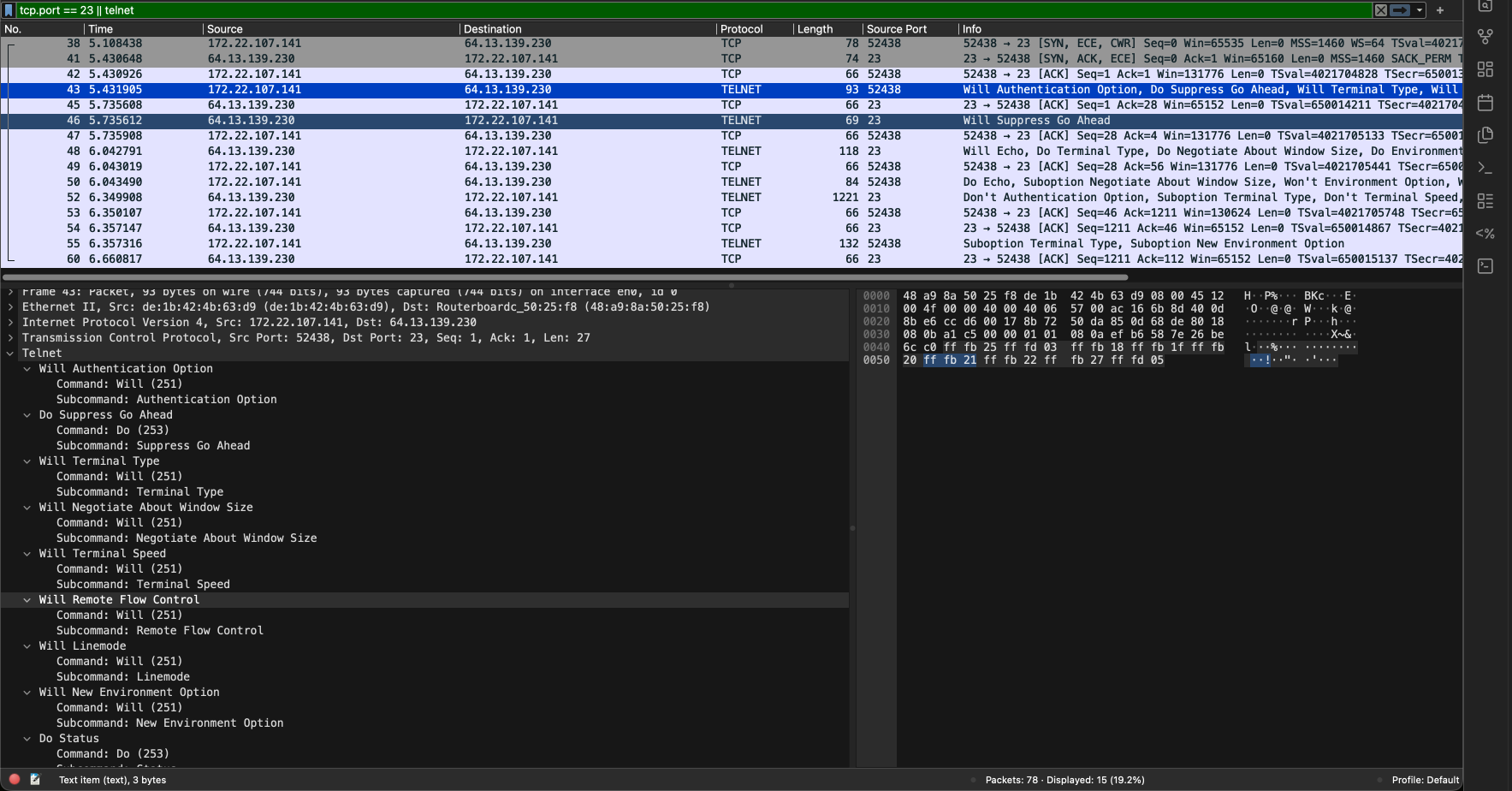
- First 3 TCP segments are for connection establishment. SYN → SYN-ACK → ACK
- Then the actual TELNET starts with the various option negotiations for terminal behaviour
- Every TELNET control message is exactly 3 bytes:
IAC <command> <option>
like for Do Suppress Go Ahead (the 2nd option)
0xff0xfd0x030xff(255) isIAC,0xfd(253) forDo, 0x03 (3) forSuppress Go Ahead
| Command | Decimal | Hex | Meaning |
|---|---|---|---|
| IAC | 255 | 0xFF | Interpret As Command (escape byte) |
| WILL | 251 | 0xFB | Sender is willing to enable an option |
| WONT | 252 | 0xFC | Sender refuses to enable an option |
| DO | 253 | 0xFD | Request receiver to enable an option |
| DONT | 254 | 0xFE | Request receiver to disable an option |
Using these 4 command options TELNET distinguishes between who requests and performs the terminal feature.
| Option | Decimal | Hex | Description |
|---|---|---|---|
| Binary Transmission | 0 | 0x00 | 8-bit binary data |
| Echo | 1 | 0x01 | Echo characters |
| Suppress Go Ahead | 3 | 0x03 | Disable GA signaling |
| Status | 5 | 0x05 | Request TELNET status |
| Timing Mark | 6 | 0x06 | Timing synchronization |
| Terminal Type | 24 | 0x18 | Terminal identification |
| NAWS | 31 | 0x1F | Negotiate About Window Size |
| Terminal Speed | 32 | 0x20 | Set terminal speed |
| Remote Flow Ctrl | 33 | 0x21 | Remote flow control |
| Line Mode | 34 | 0x22 | Line-oriented input mode |
| Environment | 36 | 0x24 | Environment variables |
| New-Environment | 39 | 0x27 | Extended environment |
Find all options : https://www.iana.org/assignments/telnet-options/telnet-options.xhtml
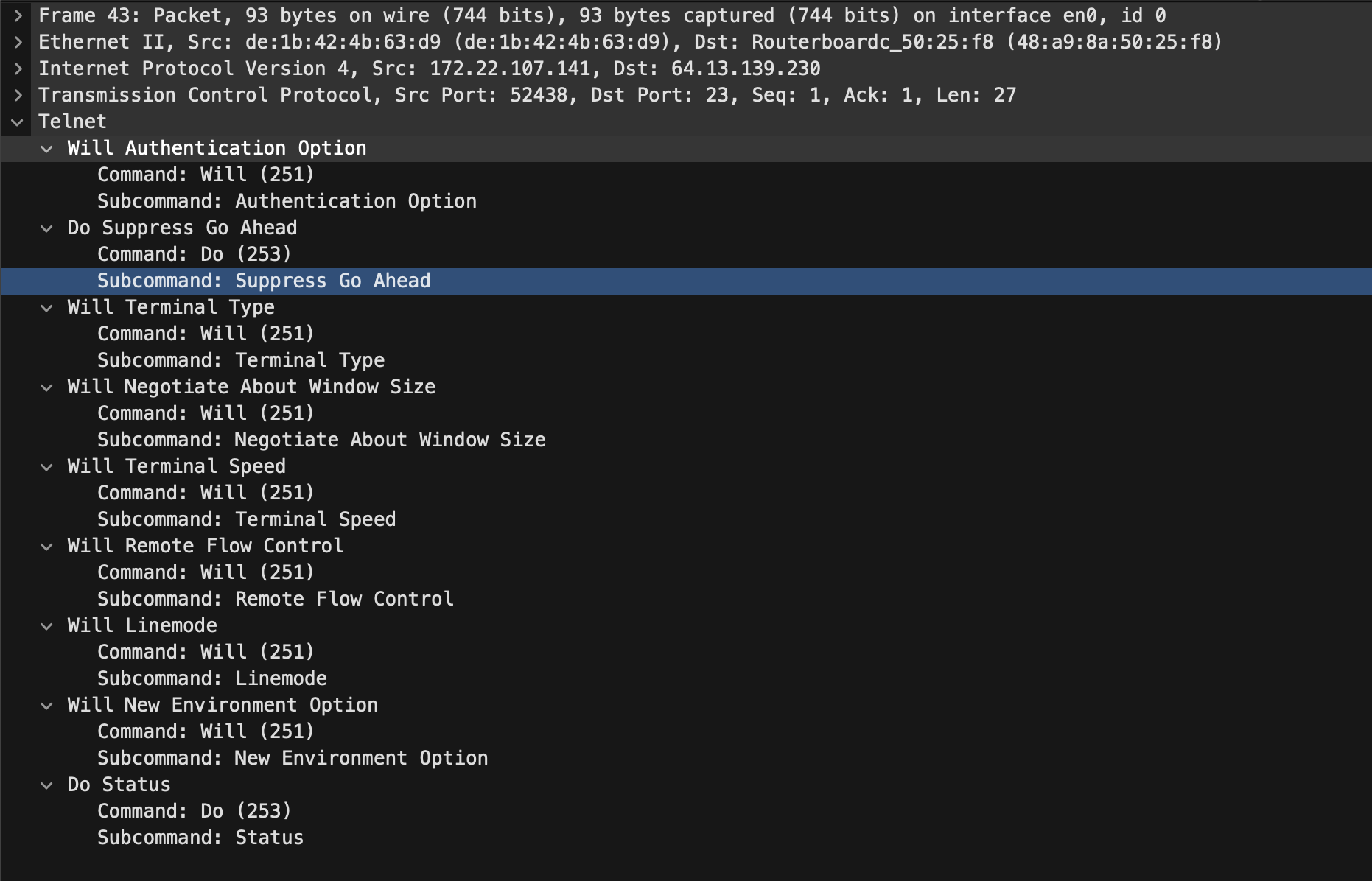
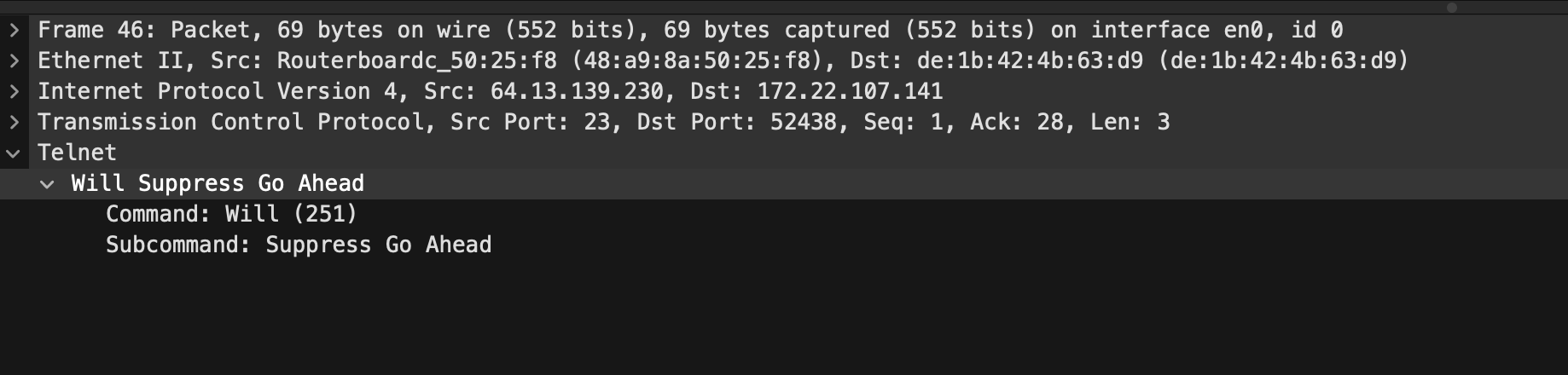
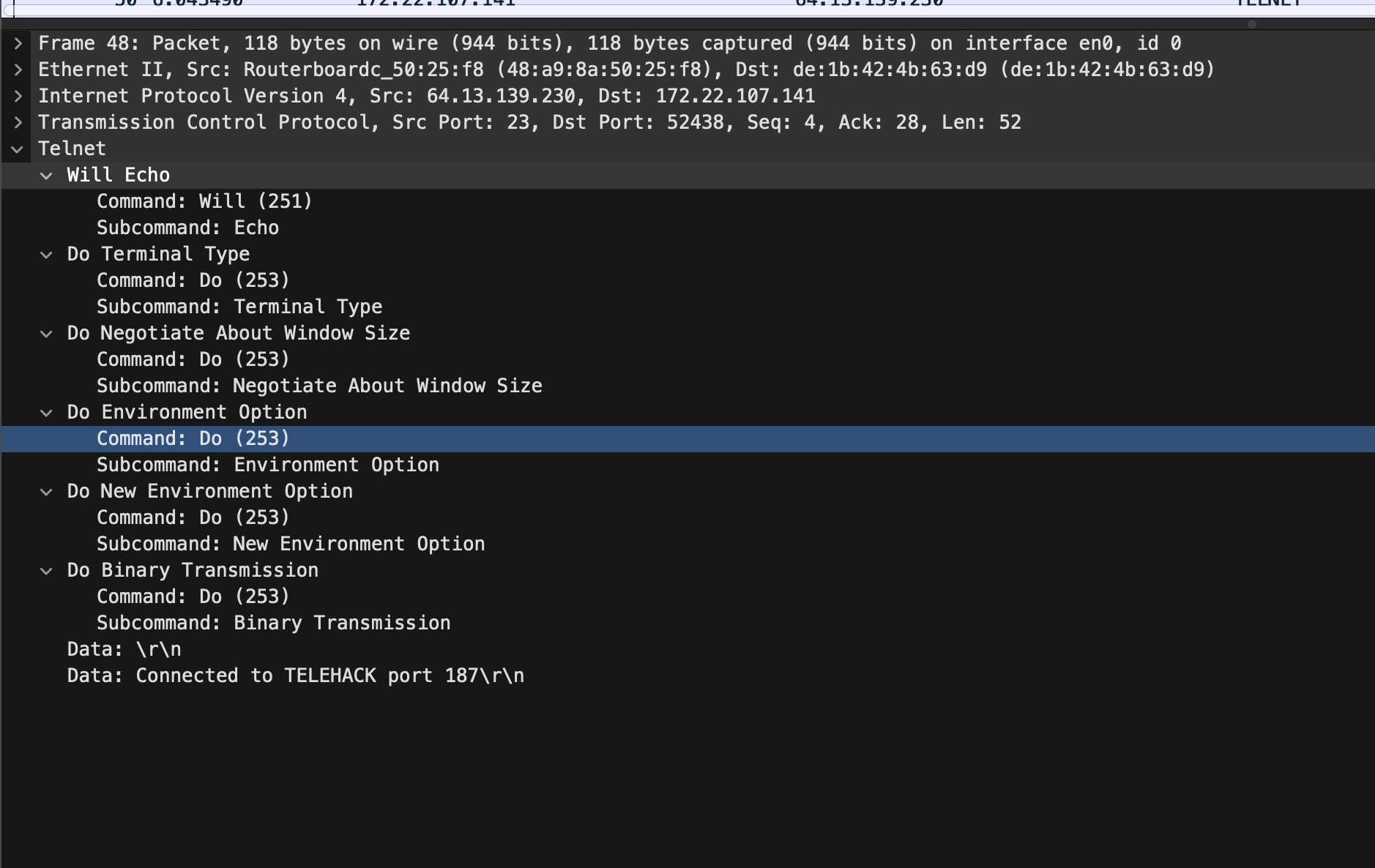
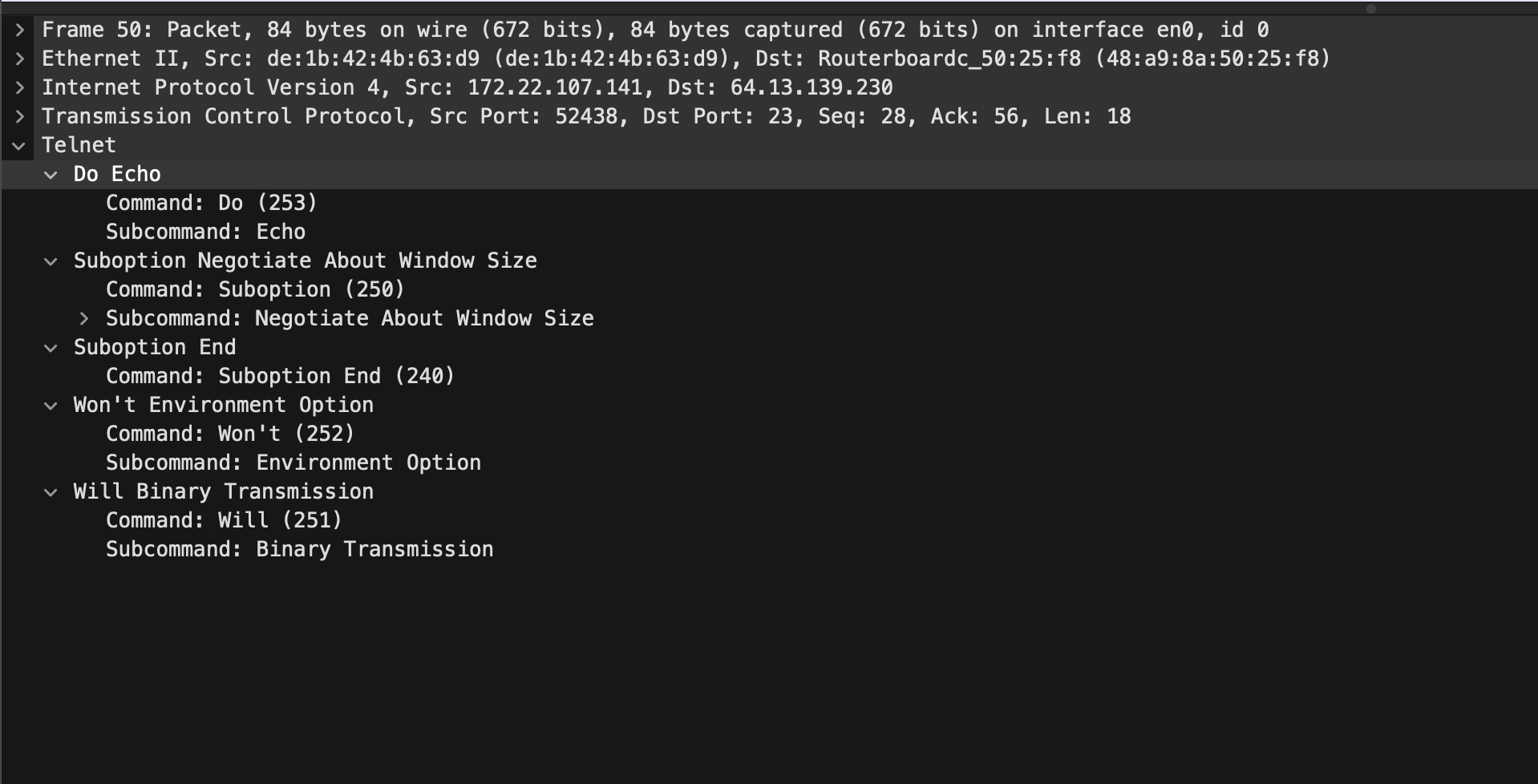
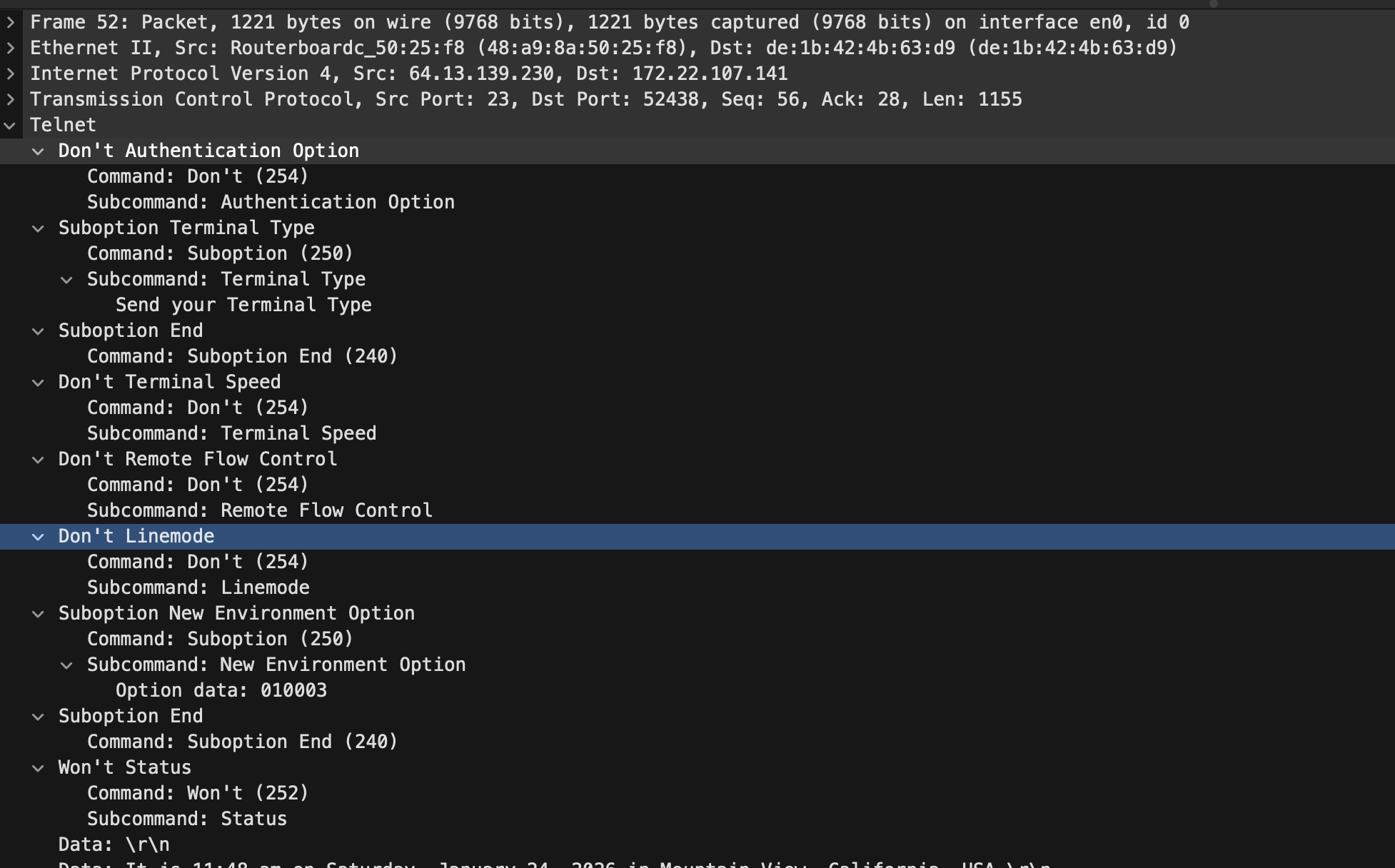
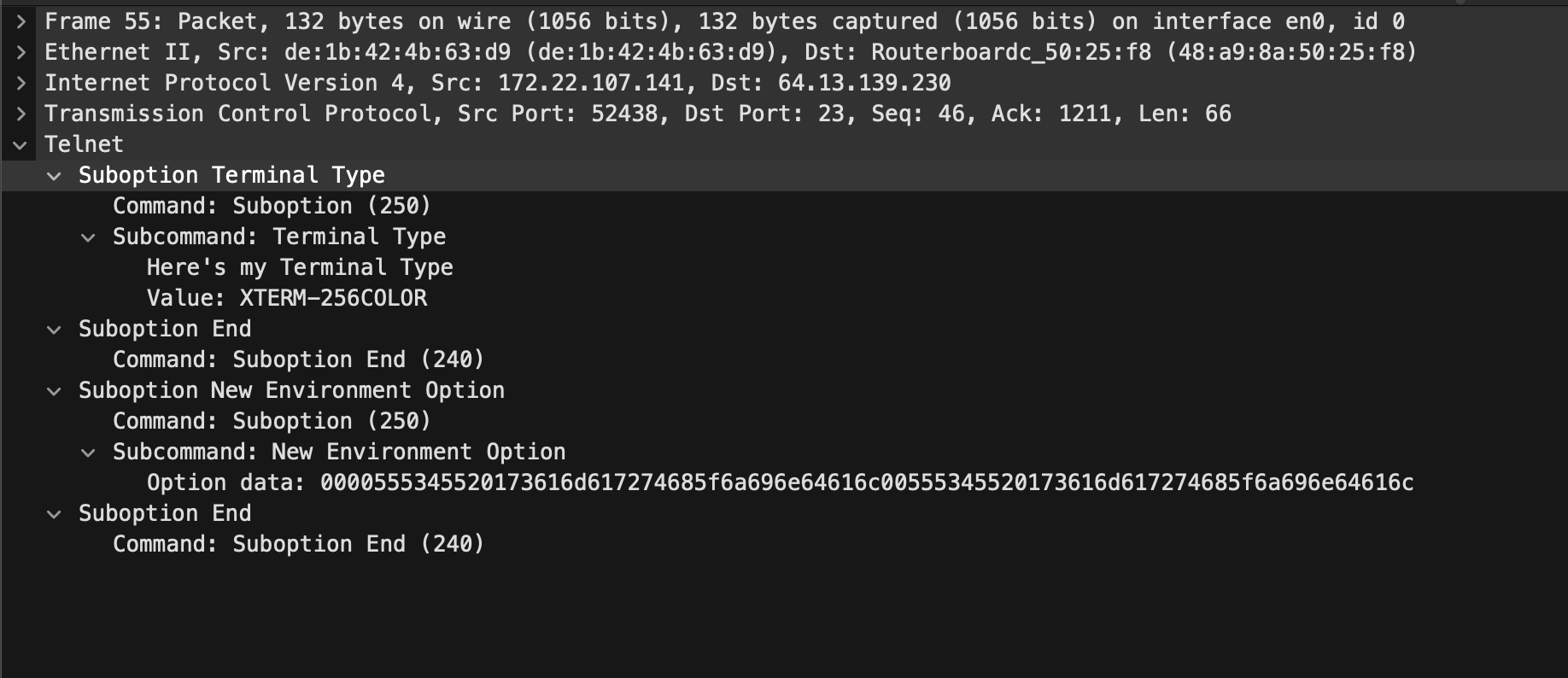
Then in the next two telnet responses , the server replies to the option negotiation with the subsequent reply and does its own option negotiation and the reply response goes on….
3. Telnet Option Negotiation Table
1
2
3
4
5
6
7
8
9
10
11
12
13
| Option              | Where (Frames) (REPLY/RESPONSE)                     |
|---------------------|-----------------------------------------------------|
| AUTHENTICATION      | 43(WILL) → 52(DONT)                                 |
| SUPPRESS GO AHEAD   | 43(DO) → 46(WILL)                                   |
| TERMINAL TYPE       | 43(WILL) → 48(DO) → 52(Suboption) → 55(Suboption)   |
| NAWS (Window Size)  | 43(WILL) → 48(DO) → 50(Suboption)                   |
| TERMINAL SPEED      | 43(WILL) → 52(DONT)                                 |
| REMOTE FLOW CONTROL | 43(WILL) → 52(DONT)                                 |
| LINEMODE            | 43(WILL) → 52(DONT)                                 |
| ENVIRONMENT/NEW-ENV | 43(WILL) → 48(DO) → 50(WONT), 52→55(Subnegotiation) |
| STATUS              | 43(DO) → 52(WONT)                                   |
| ECHO                | 48(WILL) ↔ 50(DO)                                   |
| BINARY TRANSMISSION | 48(DO) → 50(WILL)                                   |
Client: 43,50,55 Server: 46,48,52
Character by character behaviour
Also for the attached file see how each character is sent to the server and then echoed back and then displayed even the backspace. For:
File: Server Echoing
1
l s <backspace>
| Step | Direction | Byte(s) (Hex) | Byte(s) (ASCII / Escape) | Meaning |
|---|---|---|---|---|
| 1 | Client → Server | 0x6c | l | User presses l |
| 2 | Server → Client | 0x6c | l | Server echoes l |
| 3 | Client → Server | 0x73 | s | User presses s |
| 4 | Server → Client | 0x73 | s | Server echoes s |
| 5 | Client → Server | 0x7f | DEL | User presses backspace (UNIX: ASCII DEL) |
| 6 | Server → Client | 0x08 | \b | Move cursor one position left |
| 7 | Server → Client | 0x1b 0x5b 0x4b | ESC [ K | Clear line forward from cursor |
So, here the editing is happening on the remote system.
Forcing echo option
1
printf "\xff\xfb\x01" | nc telehack.com 23
This sends:
1
IAC WILL ECHO
Try the above command and see the echo delay of what ever you type, negligible right?? The client is now echoing so it is fast.
4. Network Virtual Terminal (NVT)
What NVT actually solves
Different systems use different control keys:
Telnet fixes this by defining a canonical byte level terminal call NVT
Local format ⇄ NVT format
- Data bytes: MSB = 0 (ASCII-compatible)
- Control bytes: MSB = 1
- Special byte:
IAC = 255 (0xff)
The Problem
TELNET sends everything including password in raw bytes which is susceptible to man in the middle attacks.
5. SSH (Secure Shell , its like TELNET + encryption)
Do capture using Wireshark on tcp port 22 and then do ssh -vvv <user@domain>
Then analyse the captured TCP segments for SSH or read the debug logs (because of -vvv). All the data is encrypted and hence not human readable after the key exchange.
SSH connection: what happens, in order
- TCP connection established
- Client opens TCP connection to server on port 22
- Standard TCP 3-way handshake
- Protocol version exchange
- The Client and Server exchange the SSH version
- eg:
debug1: OpenSSH_10.0p2, LibreSSL 3.3.6
- Algorithm negotiation
- Client sends supported algorithms:
- Key exchange
- Host key
- Encryption
- MAC / AEAD
- Compression
- eg:
debug1: kex: algorithm: ecdh-sha2-nistp256,debug1: kex: host key algorithm: ssh-ed25519
- Client sends supported algorithms:
- Key exchange
- Diffie–Hellman / ECDH performed
- Encryption enabled
- All further packets are encrypted
- Server authentication
- Server proves identity using host key
- Client verifies against
known_hosts
- User authentication
- Client authenticates using:
- Public key, or
- Password, or
- Keyboard-interactive
- Client authenticates using:
- Connection protocol starts
- SSH-CONN activated
- Logical channels can be created
- Session channel created
- Client requests a session channel
- Pseudo-terminal allocated
- Interactive shell starts
- Remote shell attached to the channel
- Keystrokes and output flow through encrypted channel
- Session termination
- Channel closed
- SSH connection closed
- TCP connection terminated